
Streaming services have become essential entertainment platforms, and Paramount Plus stands out with its impressive content library. However, understanding the trial refund policy is crucial before signing up. According to The Fuzz Daily, many subscribers are unaware of the specific terms surrounding their free trial period.
The streaming landscape continues evolving rapidly. Therefore, knowing your options becomes increasingly important. Many users wonder about refund possibilities after their trial period ends. This comprehensive guide covers everything you need to know about Paramount Plus trial policies and refund procedures.
Understanding the trial structure helps you make informed decisions. Most importantly, knowing how to cancel paramount free trial subscriptions prevents unwanted charges. Let’s explore the details of Paramount Plus refund policies and cancellation procedures.
Understanding Paramount Plus Free Trial Structure
Paramount Plus typically offers new subscribers a seven-day free trial period. During this time, you can access the entire content library without any charges. The trial automatically converts to a paid subscription unless you cancel beforehand.
The free trial includes access to premium content, original shows, and movies. Additionally, you can stream on multiple devices simultaneously. However, the trial period varies depending on promotional offers and your location.
Some promotional campaigns extend the trial period to 30 days. These extended trials often coincide with major content releases or seasonal marketing pushes. Nevertheless, standard seven-day trials remain the most common offering.
Key Components of the Refund Policy
Paramount Plus maintains a specific refund policy for trial subscriptions. Generally, the service doesn’t charge during the actual trial period. Therefore, traditional refunds aren’t necessary if you cancel before the trial expires.
However, situations arise where charges occur unexpectedly. Technical glitches sometimes cause premature billing. In such cases, customer service typically processes refunds promptly.
The policy also covers accidental subscription renewals. If you forget to cancel and get charged immediately after the trial ends, you may qualify for a refund. Most streaming services, including Paramount Plus, show flexibility in these situations.
When You Can Request a Refund
Several scenarios qualify for refund requests from Paramount Plus. First, technical errors resulting in premature charges warrant refund consideration. Customer service usually resolves these issues quickly and efficiently.
Second, unauthorized charges to your account qualify for immediate refunds. This includes situations where family members accidentally subscribe without permission. Documentation helps support your refund claim in these cases.
Third, service outages during your trial period may qualify you for compensation. If technical problems prevent you from accessing content, customer service often extends trials or provides refunds.
Step-by-Step Refund Request Process
Requesting a refund from Paramount Plus follows a straightforward process. Start by gathering your account information and transaction details. This includes subscription dates, payment methods, and any relevant screenshots.
Contact customer service through their official support channels. Phone support typically provides the fastest resolution for refund requests. Alternatively, you can use their online chat feature or submit email requests.
When speaking with representatives, clearly explain your situation. Provide specific dates and circumstances surrounding your refund request. Most importantly, remain polite and patient throughout the process.

How to Cancel Paramount Free Trial
Learning how to cancel paramount free trial subscriptions prevents unwanted charges. The cancellation process varies depending on how you originally subscribed to the service.
For direct subscriptions through Paramount Plus, log into your account settings. Navigate to the subscription management section. Look for cancellation options and follow the prompts carefully.
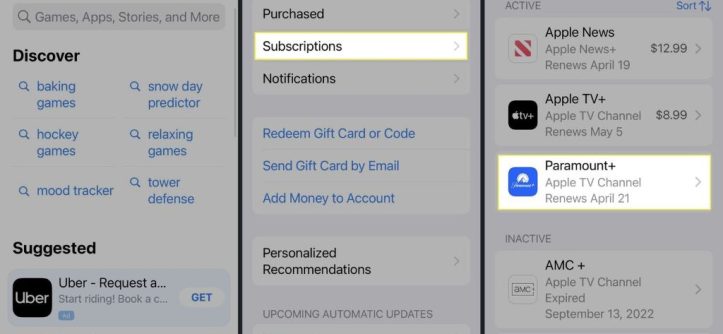
Mobile app subscriptions require different cancellation methods. iOS users must cancel through their Apple ID settings. Android users need to access Google Play Store subscriptions. These platform-specific cancellation methods are crucial to remember.
Platform-Specific Cancellation Methods
Different subscription platforms have unique cancellation procedures. Understanding these variations helps ensure successful trial cancellation.
Direct Website Subscriptions
Website subscriptions offer the most straightforward cancellation process. Simply log into your Paramount Plus account and access account settings. The subscription section displays current plan details and cancellation options.
Apple App Store Subscriptions
iOS subscriptions require cancellation through device settings. Open Settings, tap your Apple ID, then select Subscriptions. Find Paramount Plus and choose cancellation options.
Google Play Store Subscriptions
Android users must access Google Play Store for subscription management. Open the Play Store app, tap Menu, then Subscriptions. Locate Paramount Plus and follow cancellation prompts.
Amazon Prime Video Channels
Amazon subscribers need to cancel through their Prime Video account. Navigate to Prime Video settings and select Channels. Find Paramount Plus and choose cancellation options.
Timeline for Refund Processing
Refund processing times vary depending on several factors. Payment methods significantly impact how quickly refunds appear in your account.
Credit card refunds typically take 3-5 business days to process. However, some financial institutions may take longer to reflect the credit. Debit card refunds often appear faster than credit card transactions.
Digital wallet refunds, such as PayPal or Apple Pay, usually process within 24-48 hours. These payment methods generally offer the quickest refund experiences.
Common Refund Scenarios and Solutions
Various situations may require refund requests from Paramount Plus subscribers. Understanding common scenarios helps you navigate the process more effectively.
Accidental double charges occur when technical glitches cause multiple transactions. Customer service typically resolves these issues immediately upon notification. Keep transaction receipts as documentation for your claim.
Family member subscriptions without authorization also qualify for refunds. Many parents discover unexpected charges from children’s device usage. Paramount Plus usually accommodates these situations with proper explanation.
Service quality issues during trial periods may warrant compensation. If streaming problems significantly impact your experience, customer service often provides refunds or trial extensions.
Alternative Solutions to Refunds
Sometimes refund requests aren’t necessary if alternative solutions meet your needs. Paramount Plus customer service offers various options beyond traditional refunds.
Trial extensions provide additional time to evaluate the service. If technical issues disrupted your original trial, representatives might extend your access period. This solution allows proper service evaluation without financial loss.
Account credits offer another alternative to cash refunds. These credits apply toward future subscription payments if you decide to continue service later. Credits typically remain valid for extended periods.
Preventing Unwanted Charges
Proactive measures prevent unwanted subscription charges more effectively than seeking refunds afterward. Set calendar reminders before your trial period expires to avoid automatic billing.
Review your payment method notifications regularly. Many credit cards and digital wallets send transaction alerts immediately. These notifications help you catch unauthorized charges quickly.
Consider using prepaid cards for trial subscriptions. This method limits potential charges to the card’s available balance. Prepaid cards provide additional security for trial subscriptions across various services.
Customer Service Contact Information
Reaching Paramount Plus customer service requires using their official support channels. Phone support typically provides the most immediate assistance for urgent refund requests.
The customer service phone line operates during standard business hours. However, chat support and email options remain available 24/7 for non-urgent inquiries.
Social media channels also provide customer service access. Twitter and Facebook support teams often respond quickly to public inquiries. However, avoid sharing sensitive account information through social media platforms.
Documentation Required for Refunds
Proper documentation strengthens your refund request significantly. Gather all relevant information before contacting customer service representatives.
Transaction confirmations provide essential proof of payment. Email receipts show exact dates and amounts charged to your account. Screenshot these documents for easy reference during conversations.
Account activity logs help explain subscription timing issues. These logs show when you signed up, trial periods, and conversion dates. Access this information through your account settings before calling support.
Tips for Successful Refund Requests
Certain strategies increase your chances of successful refund requests. Preparation and professional communication significantly impact outcomes.
Contact customer service promptly after discovering unwanted charges. Quick action demonstrates legitimate concern and increases refund likelihood. Delayed requests may face additional scrutiny from representatives.
Explain your situation clearly and concisely. Provide specific dates, amounts, and circumstances surrounding your refund request. Clear communication helps representatives understand and resolve issues faster.
Conclusion
Understanding Paramount Plus trial refund policies protects you from unwanted subscription charges. The service typically offers flexible refund options for legitimate situations, including technical errors and unauthorized subscriptions.
Remember that prevention remains more effective than seeking refunds afterward. Set reminders to cancel your trial before automatic billing begins. Additionally, familiarize yourself with platform-specific cancellation methods based on your subscription source.
Keep proper documentation of all transactions and account activities. This information proves invaluable when requesting refunds or resolving billing disputes. Finally, contact customer service promptly when issues arise to maximize your chances of successful resolution.
Most importantly, knowing how to cancel paramount free trial subscriptions empowers you to make informed decisions about continuing your Paramount Plus subscription beyond the trial period.
Frequently Asked Questions
How long do I have to cancel my Paramount Plus free trial?
You can cancel your Paramount Plus free trial at any time during the trial period without being charged. Most trials last seven days, but some promotional offers extend to 30 days. Cancel before the trial ends to avoid automatic billing.
Will I get a refund if I forget to cancel my free trial?
Paramount Plus may provide refunds for accidental charges immediately following trial expiration. Contact customer service promptly to explain your situation. Many subscribers receive refunds for honest mistakes, especially first-time occurrences.
How do I cancel my Paramount Plus trial on different devices?
Cancellation methods vary by subscription platform. Direct website subscribers cancel through account settings. iOS users must cancel through Apple ID settings, while Android users use Google Play Store. Amazon Prime Video Channel subscribers cancel through Prime Video settings.
How long does it take to receive a Paramount Plus refund?
Refund processing times depend on your payment method. Credit cards typically take 3-5 business days, while debit cards may be faster. Digital wallets like PayPal usually process refunds within 24-48 hours. Contact your financial institution if refunds don’t appear within expected timeframes.
Can I get a partial refund if I cancel mid-subscription?
Paramount Plus generally doesn’t offer partial refunds for canceled paid subscriptions. However, exceptional circumstances like service outages or technical issues may qualify for prorated refunds. Contact customer service to discuss your specific situation and explore available options.
Read More:
How to Find Inspiration for Art: Unlock Your Creative Potential




Leave a Reply