Speaky Magazine
  • Home
  • About
  • Celebrity Gossip
    • Scandal
  • Lifestyle
    • Shopping
    • Fashion
    • Wedding
  • Tourism
    • Places
  • Trends
    • Opportunities
  • Renovation
    • Exterior Design
    • Interior Design
    • Garage
    • Gardening
  • High Tech
    • Devices
    • Digital Marketing 
    • Internet
  • Games/Sports
  • Vehicle
  • Well-being
    • Diet
    • Exercise
    • Fitness
    • Healthy Food
    • Natural Remedies
    • Spa
    • Yoga
  • Write for us
  • Privacy
  • Contact US
Home  /  Devices • High Tech  /  The Launch of Apple’s iPadOS

The Launch of Apple’s iPadOS

James Barnes October 11, 2019 Devices, High Tech Leave a Comment
Apples iPadOS

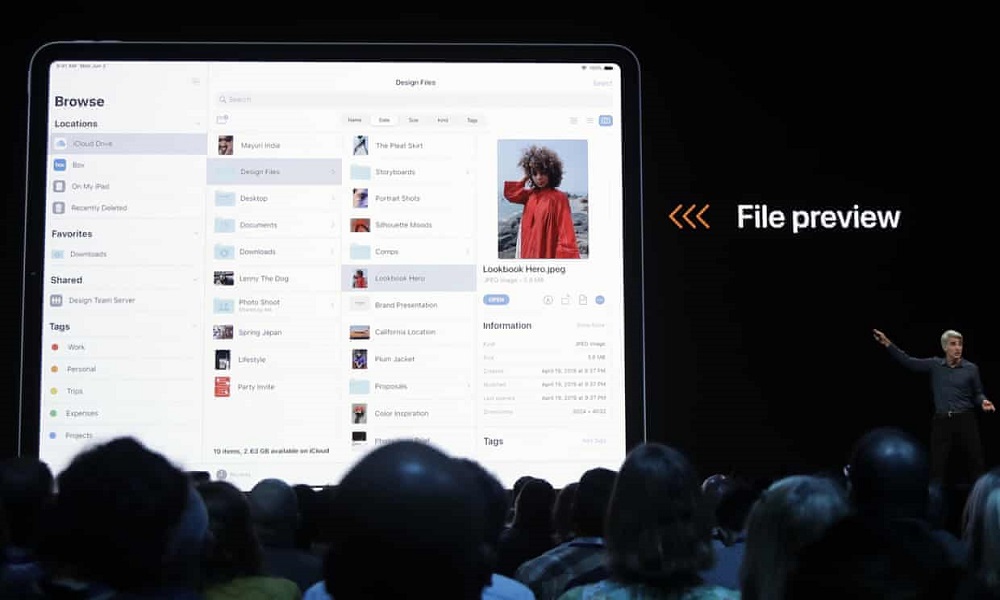
During this year’s annual WWDC 2019 Apple unveiled its latest iOS, but also made a surprising announcement of its new mobile operating system – iPadOS, a rebranded iOS to be used on iPads only. Even though new iOS 13 and iPadOS 13 are built on the same platform, iPadOS is enhanced and tweaked so that it can make better use of a large Multi-Touch display, offering new and distinguished features to iPad users.

Table of Contents

Toggle
  • Here are the most important new features of this OS coming this fall, that will make the iPad experience truly distinct.
    • A New Homescreen
    • Multitasking Improved
    • External Storage 
    • Surfing in Desktop Mode
    • Apple Pencil Improved
    • New Gestures and Fonts
    • Sidecar
    • Performance Boost

Here are the most important new features of this OS coming this fall, that will make the iPad experience truly distinct.

A New Homescreen

The new Apple’s OS will make the iPad’s home screen more tablet oriented. This basically means that its grid of applications is tighter, so you can see more apps – 6 in one row, and there is more usable space on the display.
The option to show TodayView on the Home screen, alongside apps, will introduce quick access to frequently used widgets, similar to widgets on Android tablets. This change will now replace a lot of boring dead space on the display and make use of it.

Multitasking Improved

With its newest OS, Apple is working on improving multitasking features. There are two features iPad users will find easy and intuitive to use:

  • Slide Over – users can now drag a favorite app from the dock and drop it on their screen, and they can scroll through and switch between multiple apps using a new carousel interface.
  • Split View – users will now be able to use multiple windows for the same app, or two different apps opened next to one another.

External Storage 

The new iPadOS will now support a USB drive or an SD card reader, making it easier for users to access data stored on other devices, and easily manage them using the Files app. No third party apps will be needed, and no intermediary Mac to give support to the process.

In addition to this, it will be possible to directly connect a camera to the iPad, and import photos directly into editing apps, such as Lightroom.

Surfing in Desktop Mode

While with iOS 12 browsing the Internet on the iPad was the same as on the iPhone, that is restricted to a mobile-view, Safari will now open websites in a modified web view, giving users the real web browsing experience, optimized for touch.

The users will benefit from this improvement, as they will now be able to use desktop versions of web applications, such as WordPress or GoogleDocs.

Also, a Download Manager will be included, so the files and media downloaded from the web can easily be accessed in the download folder.

Apple Pencil Improved

iPad users will be happy to see the new improvements of the Apple Pencil, with the latency now decreased from 20ms to 9ms.

Swiping from the corner of the display with the Apple Pencil will open the Markup view, making it possible for users to put their notes to anything on the screen – webpages, screenshots, documents, and emails.

Also, a new tool palette is introduced, offering quick access to tools, color palettes, shapes, an eraser, etc.

New Gestures and Fonts

Apple has finally decided to take working on documents to the next level. This means that selecting, pasting, and copying text will be much simpler.

Users can now just tap on a word and swipe to where they want their selection to end, such as the end of the sentence, or the paragraph. The selection can be easily handled using three-finger gestures for copy, and paste, while there is also a three finger-gesture for undoing an action.

Also, new fonts can be downloaded and purchased from the AppStore, and they can be used in various apps.

Sidecar

With this new feature, users will be able to use their iPads as an extended display for their Mac desktop, as a second display, or to mirror its content. Also, when used together with the Apple Pencil, an iPad can be used as a drawing tablet, using a wired or wireless connection, within a 10-meter range,

Besides, you can seamlessly transfer your sketches to your Mac with a simple drag-and-drop feature.

Performance Boost

New tablet-specific OS is believed to be much faster than iOS12. Apple claims that the FaceUnlock feature now works 30% faster while applications open twice as fast as on the previous OS. Also, the apps are smaller when it comes to their download size, which means that they take less storage space.

So, if your iPad is one of the tablets getting an update this fall, you will get quite a performance boost, as well as a lot of new features which will make it more possible to use your iPad as a laptop replacement.

Also, this might be the perfect time to convert your android app to ios.

Tags: Apple, iPadOS

Previous Article
Next Article

About Author

James Barnes

James Barnes is an experienced wedding organizer and blogger at theannexevents.com. He specialized in organizing outdoor wedding events. When he isn’t writing about weddings and marital life, David usually goes swimming or playing squash.

Related Posts

  • How frequently should you test your smoke alarms?

    How frequently should you test your smoke alarms?

    December 15, 2025
  • Top reasons to invest in data analysis

    Top reasons to invest in data analysis

    November 27, 2025
  • Before you click go live: the ultimate website launch checklist

    Before you click go live: the ultimate website launch checklist

    November 24, 2025

Leave a Reply

Cancel reply

This site uses Akismet to reduce spam. Learn how your comment data is processed.

Search

Social Media

About Speaky Magazine

Speaky Magazine was founded in January 13, 2018; more than 1 and half yeas ago. The context has changed, although the basic concern remains: to guide the reader through a trends perspective of reality (local and global), helping him to form an informed, well-founded and mature judgment on the issues discussed in society. In other words, contribute to the formation of a conscience capable of discerning.

Read more…..

Write for Speaky Magazine

We are looking for writers, bloggers and journalists to write unique and useful articles about lifestyle and daily trends. Topics include: Decor, small business ideas, sports, lifestyle, fashion, relationship, wedding ideas, photography tips, travel tips and many more.

Read more….

Popular post

  • VEVOR electric pasta maker with multiple pasta dies for making 8 pasta shapes at home.VEVOR Electric Pasta Maker: Make 8 Shapes of Pasta at Home
  • Young child skateboarding while wearing full BOSONER protective gear set including knee, elbow, and wrist padsWhy BOSONER Kids Pads Are a Must-Have for Skateboarding Safety
  • Modern sustainable house with solar panels and energy-efficient windows surrounded by native landscapingReal Estate Business Plan for Sustainable Housing Investments
  • Homemade pasta being shaped using RAFBAR roller and cutters attachmentRAFBAR Pasta Maker Attachment Review: Roller and Cutters Explained
  • DEWALT 20V MAX Jig Saw cutting through hardwood with precision and easeWhy DEWALT Power Tools Dominate: Deep Review of the 20V MAX Jig Saw

Random Posts

  • Noon return policy
    Noon Return Policy: Your Complete Guide to Hassle-Free Returns and Refunds in 2025 July 7, 2025
  • The Perfect Timber Floor
    5 Bed Staging Tips that Interior Design and Hospitality Experts Swear By March 4, 2022
  • How do you position a laser level?
    Laser Levels: A Game-Changer for Modern Plumbers July 14, 2024
  • The Rise in Online Shopping and How Industry has Changed December 2, 2021

Category Posts

  • AVID POWER cordless drill in action, showcasing keyless chuck gripping a wood bit during a 2025 project
    Comparing Cordless Drills: AVID POWER vs. Competitors in 2025 November 22, 2025
  • How Building Materials Impact Worker Safety in Modern Towns August 31, 2025
  • Wie Windgeister unsere Stimmung und Kreativität beeinflussen August 23, 2025
  • Unlocking the Secrets of High-Reward Systems in Modern Design August 18, 2025

Categories

  • Business
  • Celebrity Gossip
  • Devices
  • Diet
  • Digital Marketing 
  • Education
  • Entertainment
  • Exercise
  • Exterior Design
  • Fashion
  • Fitness
  • Food and Drink
  • Furniture
  • Games/Sports
  • Garage
  • Gardening
  • Gift Ideas
  • Healthy Food
  • High Tech
  • Interior Design
  • Internet
  • Lifestyle
  • Mountain
  • Natural Remedies
  • Opportunities
  • Pet Care
  • Places
  • Plumbing
  • Renovation
  • Reviews
  • Sea
  • Shopping
  • Social Media
  • Spa
  • Tourism
  • Trends
  • Vehicle
  • Wedding
  • Well-being
  • Yoga

Archives

Theme by ThemesPie | Proudly Powered by WordPress